
How does ATS software read your resume?
An applicant tracking system (ATS) helps employers manage applications and may turn your resume into organized candidate details. Parsing, keyword search, and screening are separate tasks, and setups vary. People usually still review candidates, although configured rules may screen some applications earlier.
If applications have brought little response, it is understandable to wonder whether software missed your experience. A clear resume helps, but a rejection alone does not tell you what happened or mean you did something wrong.
How parsing turns a file into candidate details
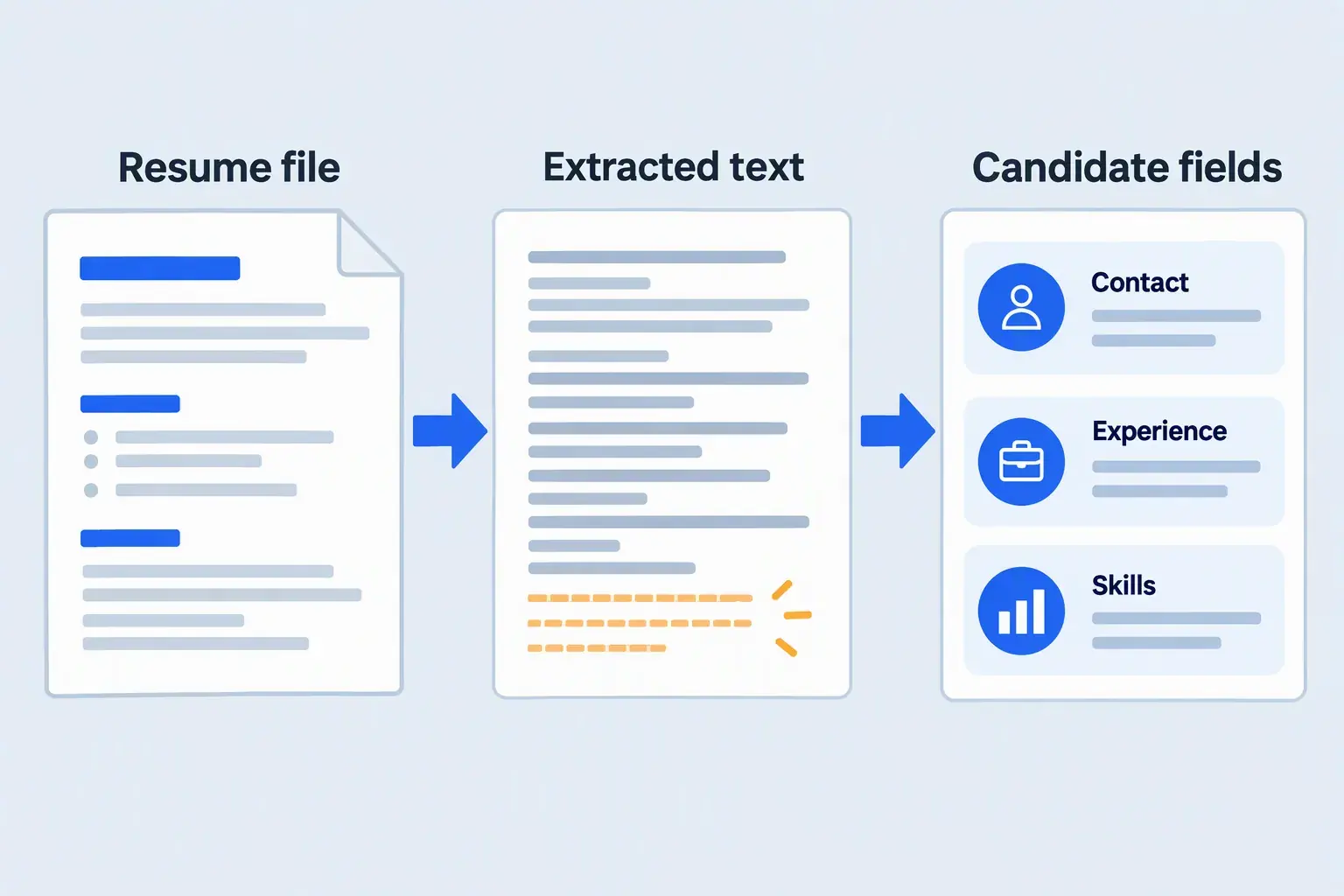
Parsing means organizing document content into fields, such as contact details and work history. Text extraction retrieves the words; the parser then tries to identify which belong to a company, job title, date range, or qualification.
A successful upload does not prove that every field was filled correctly. Greenhouse’s parsing documentation describes partial results and files that remain attached when parsing fails, with details needing manual entry.
That is a specific vendor example, rather than a rule for every ATS. If an application fills fields from your resume, compare them with the original and correct missing or misplaced details before submitting.
 Enlarge image ↗
Keywords help people find relevant experience
Keywords name skills, tools, qualifications, or work that someone wants to find. Greenhouse documents full-text searches that return matching candidates and a snippet showing where search terms appear.
This search feature does not establish a required keyword percentage. Use the job description’s terms when they accurately describe your experience, and explain where you used the skill.
Before and after: make the work specific
Responsible for reporting and database tasks.
Used SQL to build weekly inventory reports for the operations team.
This fictional revision keeps the original reporting idea while naming the tool, output, and audience. Use the pattern for work you actually did; no invented metric is needed.
If a checker flags a missing skill, decide whether it is absent from your wording or your experience. Editing can explain a qualification you have; it cannot supply one you lack.
Screening can use application answers
Screening checks applicants against requirements and is separate from parsing. Greenhouse’s auto-reject rules, for example, let employers reject applicants based on specified answers to custom questions.
Its documented example concerns a required commercial driver’s license. A readable resume cannot override a required qualification, so answer accurately and keep form answers consistent with your document.
A fast rejection does not reveal which rule or decision caused it. Avoid treating the timing of an email as proof that your resume failed a keyword test.
What software can miss
Words inside a scanned image
A scanned resume can look readable while containing an image instead of text. Optical character recognition (OCR) is a separate process that recognizes words in images; this site’s browser checks do not support it.
If the extracted view is empty, export a text-based PDF from your original document. Other systems may work differently, so follow the employer’s instructions rather than assuming it supports scans.
The order of details
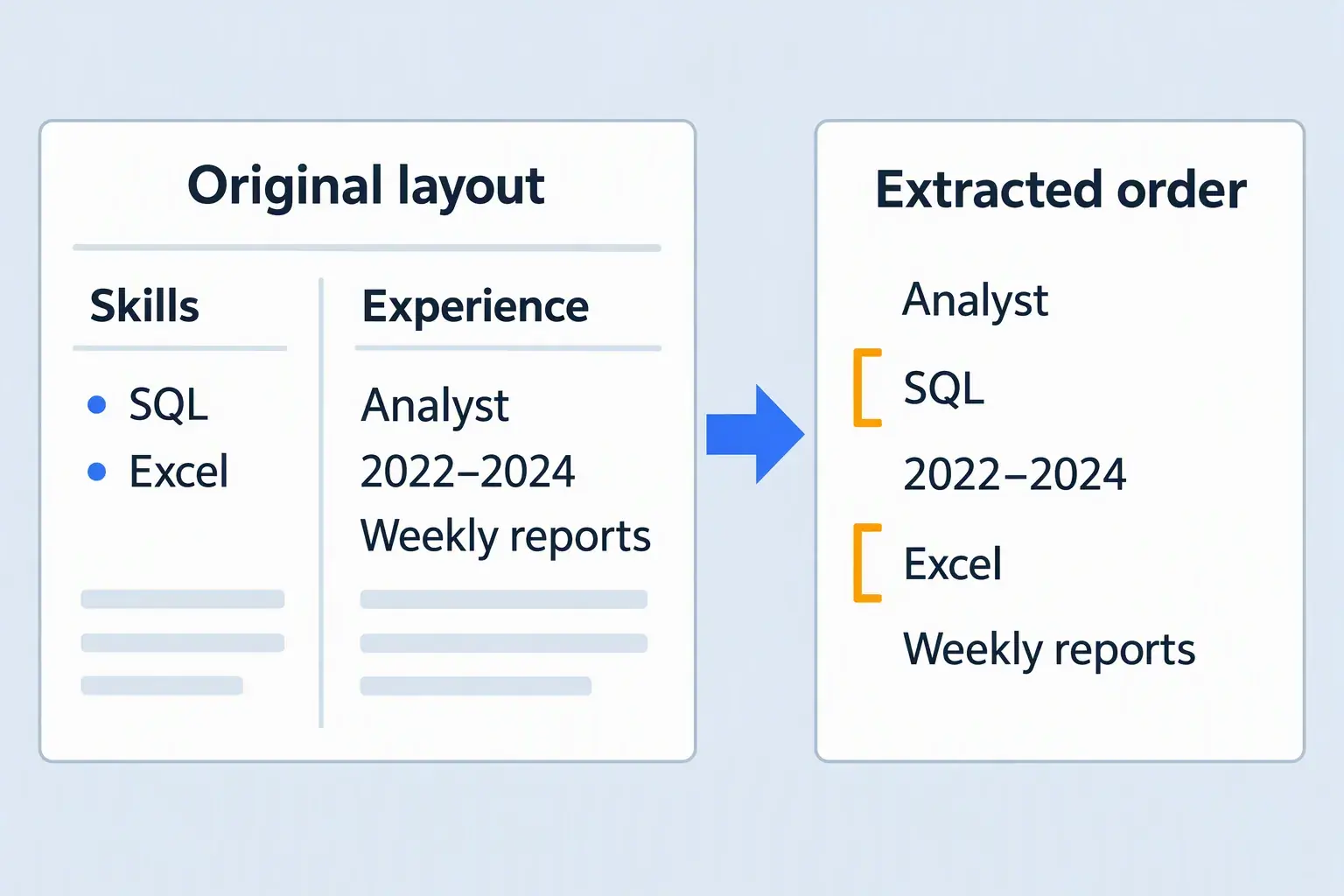
Columns help a person see groups, but extracted text may follow a different order. Skills can interrupt a job’s title, dates, and achievements even when the words themselves survive.
 Enlarge image ↗
Greenhouse lists columns, complex tables, headers, footers, and text boxes among possible parsing problems. This does not mean every parser fails on every columned resume; simpler grouping is a practical precaution.
Keep contact details in the main body and group each role’s employer, title, dates, and bullets together. Copying into a plain-text editor can expose obvious problems, but it does not reproduce every employer’s parser.
The context behind a claim
A skill list does not explain what you built, who used it, or how independently you worked. Give relevant skills context in your experience bullets, and use accurate outcomes or scope when available.
Do not add hidden white text, copy the job description into your resume, or invent credentials. These tricks misrepresent your qualifications and give readers no reliable evidence of your work.
What this free checker can tell you
This site is powered by Democruit, a brand of Aequovia, LLC. Separate browser checks extract PDF text; after consent, your PDF and optional job description go to Democruit for AI analysis with Azure AI.
The analysis reviews content, with job comparison only when you provide a description. It does not measure the original PDF’s fonts, columns, or page geometry, or certify another system’s parsing.
Use the fictional sample report to see how feedback is presented. A checker score is a guide, not an employer’s score or an interview guarantee; compare findings with your original resume.
Your next step before applying
Keep your facts accurate, your work easy to follow, and relevant skills supported by examples. Review extracted details and application answers instead of chasing a number that cannot predict the employer’s decision.
Run the free ATS resume check to find details worth reviewing. For help choosing how to arrange your work history, read Democruit’s guide to resume formats.
Vendor sources checked October 4, 2026. Both illustrations and the before/after example are conceptual; employer settings and software features can change.
Frequently asked questions
Does an ATS reject every resume it cannot parse?
A parsing failure does not always mean rejection. Greenhouse documents cases where the resume remains attached and details need manual entry; what happens next depends on the employer’s process.
Can I use a two-column resume?
Some parsers may misread columns, but a two-column layout does not always fail. A simple layout is a useful precaution; review the extracted order and any application fields before submitting.
What ATS score do I need to get an interview?
There is no universal passing score that this checker can provide. Its feedback helps you review your resume; it does not reveal an employer’s settings or guarantee an interview.
Should I submit a PDF or a Word document?
Follow the employer’s application instructions and accepted formats. This free checker accepts PDF only, so checking a PDF does not establish that it is the required format for your application.